
Review Edited Messages
Advocates can edit or add to the message being sent to your campaign recipients. If you’d like to manually approve these messages before they’re sent, you can opt in to review edited message for each relevant landing page.
Please note that by default, all edited messages are sent to lawmakers without manual review. Additionally, Facebook lead form messages are unable to be edited and therefore are not eligible for message review.
First, navigate to the campaign you’d like to review messages for. Then, click the edit icon on the landing page you’d like to opt in for message review.

Once you’re on the landing page builder, navigate to the Form section.
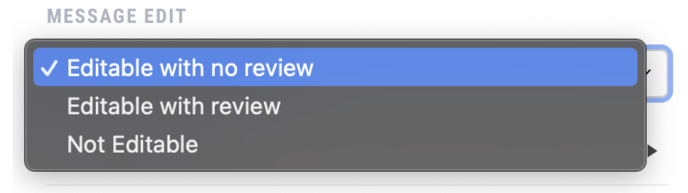
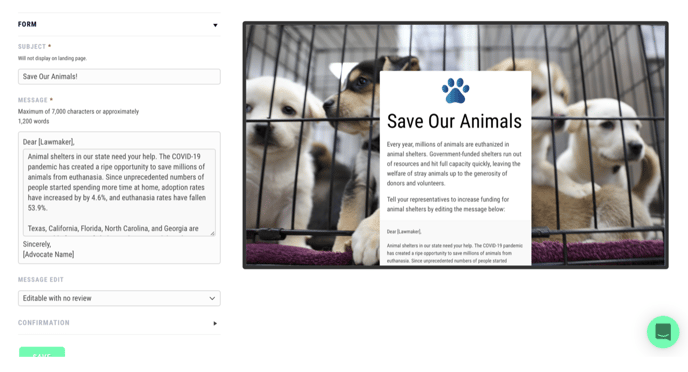 Under the Message Edit setting, choose whether you’d like to review edited messages, have them send without review, or remove the ability to edit messages entirely. Make sure to save before exiting.
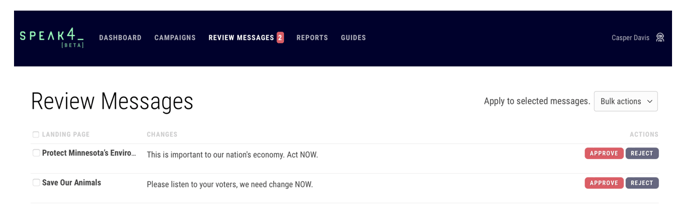
 Once advocates begin editing messages, they will appear in the Review Messages tab at the top of your Speak4 dashboard. Keep in mind that previously edited messages have already been sent to your recipients, and until advocates edit and send new messages, nothing will appear in the Message Review tab.
On the right, you can review the changes that the advocate has made to the message. Click “approve” or “reject” for each edited message. You can also approve or reject messages in bulk.
Please note that email confirmations are sent to advocates immediately, regardless of message review status. Rejected messages will not be sent to campaign recipients, and will not show in your campaign metrics or generated reports. Advocates will not be notified of the message rejection. You may change the message review settings on your landing pages at any time.
Still have questions? Contact us at team@speak4.co.