
Speak4 allows you to quickly and easily prefill advocate data on your landing pages by using query strings – making it even easier for your supporters to take action and speak up for the causes they believe in.
For example, if you have an email list of supporters, you can pass your supporters’ information into Speak4 via a query string and any information you provide – such as name, email address, phone number or address – will be prefilled on the Speak4 landing page.
This saves your supporters time and makes it more likely they will take action on your campaign.
Speak4 currently accepts the following parameters:

Parameters can be added to the heading and body sections of a landing page in the content section. They cannot be inserted into the message sent to lawmakers in the form section of the landing page builder. You can also pass custom parameters to the landing page content using the same format above, e.g. .
Inserting Parameters On A Landing Page
Select the landing page you want to edit. Open the page editor and simply insert one of the parameters to the content or heading sections.
You can add as many parameters as you would like onto the page content section. You can also just leave the landing page as is and pass parameters to the form fields directly.
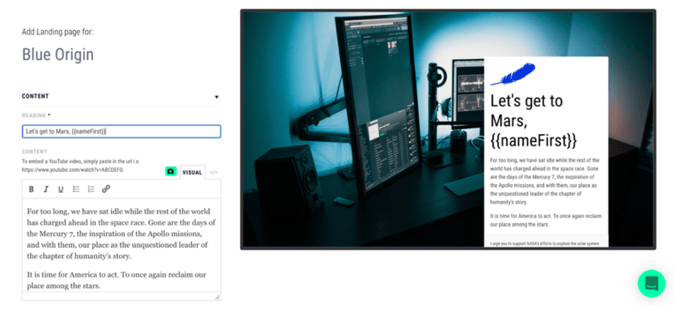
Formatting The Query String
In order to utilize your query, go to the landing page URL. Once there, insert the following at the end of the url: ?parameter=definition
Example:
?prefix=Mr.
?nameFirst=John
?nameLast=Smith
?email=john@gmail.com
?phoneMobile=2021234567
?address1=101 Main St
?city=Anytown
For example, if the URL query looks like this: https://speak4.app/lp/226bf5/?nameFirst=Samuel
The corresponding landing page will look like this:
 Notice that the string is not only in the title, but filled in the form field as well.
Passing Multiple Parameters
Passing more parameters will make it even simpler for advocates to take action.
In the editor, simply add additional parameters to content sections.
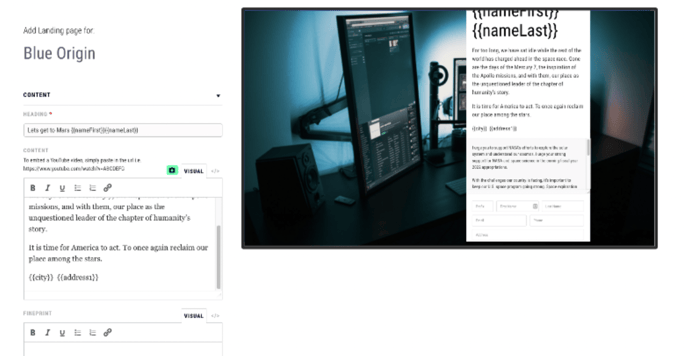 Go to the landing page URL and insert your parameter values, simply insert “&” after each successive parameter. Spaces will turn into %20 once you load the landing page.
For example, if your URL looks like this:
https://speak4.app/lp/226bf5/?nameFirst=Samuel&nameLast=Girma&address1=2553 little vista terrace
The corresponding landing page will look like this:
 Notice all the data in the URL query string has been prefilled on the landing page, thereby saving the advocate from having to re-enter their information, and increasing the chance they’ll take action via the campaign.
Passing Advocate Data Onto External Sites
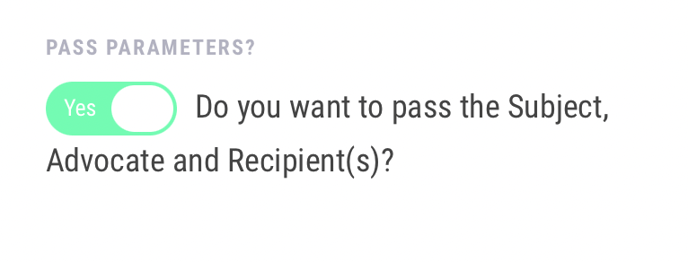
You also have the option of prefilling any advocate data onto a second website when using a redirect confirmation type. This could be used to create a chain of advocacy by redirecting advocates to another landing page or sending them to a personalized donation page. Simply enable the “Pass Parameters” toggle in your landing page settings, and Speak4 will pass through any gathered data in the URL.
Still have questions? Contact us at team@speak4.co.